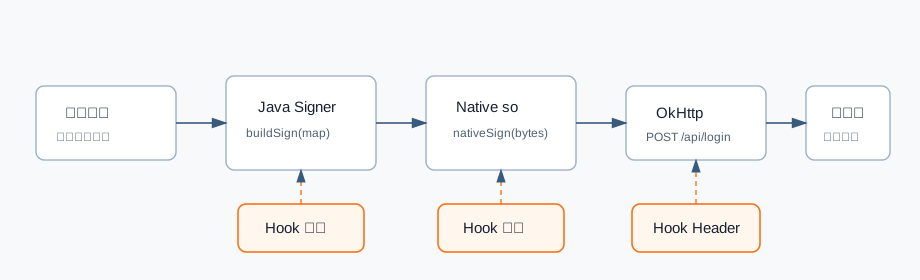
这篇是 Frida 使用指南的实战补充。重点不是解释概念,而是整理一些可以复制后改类名、方法名、包名就能用的脚本模板。
建议先读:Frida 使用指南与常见问题 。
脚本骨架 复杂脚本建议先写统一骨架:
1
2
3
4
5
6
7
8
9
10
11
12
13
14
15
16
17
18
19
20
21
22
23
24
25
26
27
28
29
'use strict' ;const config = { packageName : 'com.example.app' , keyword : '/api/' , printStack : false , }; function log (tag, message ) { console .log (`[${tag} ] ${message} ` ); } function safeString (value ) { try { if (value === null || value === undefined ) { return String (value); } return value.toString (); } catch (e) { return `<toString error: ${e} >` ; } } setImmediate (function ( Java .perform (function ( log ('init' , 'script loaded' ); hookUrls (); }); });
脚本变大后,所有输出都带标签,后期查日志会舒服很多。
Hook URL 构造 适合初步定位请求目标:
1
2
3
4
5
6
7
8
9
10
function hookUrls ( const URL = Java .use ('java.net.URL' ); URL .$init .overload ('java.lang.String' ).implementation = function (url ) { if (String (url).indexOf ('http' ) === 0 ) { log ('URL' , url); } return this .$init(url); }; }
如果 URL 是通过 URI 构造:
1
2
3
4
5
6
7
8
9
10
Java .perform (function ( const URI = Java .use ('java.net.URI' ); URI .$init .overload ('java.lang.String' ).implementation = function (uri ) { if (String (uri).indexOf ('http' ) === 0 ) { console .log ('[URI]' , uri); } return this .$init(uri); }; });
Hook OkHttp Request 很多 Android App 使用 OkHttp。可以 Hook Request.Builder.url:
1
2
3
4
5
6
7
8
9
10
11
12
13
Java .perform (function ( const Builder = Java .use ('okhttp3.Request$Builder' ); Builder .url .overload ('java.lang.String' ).implementation = function (url ) { console .log ('[okhttp url String]' , url); return this .url (url); }; Builder .url .overload ('okhttp3.HttpUrl' ).implementation = function (url ) { console .log ('[okhttp url HttpUrl]' , url.toString ()); return this .url (url); }; });
打印 Headers:
1
2
3
4
5
6
7
8
9
Java .perform (function ( const Request = Java .use ('okhttp3.Request' ); Request .headers .implementation = function ( const ret = this .headers (); console .log ('[headers]' , ret.toString ()); return ret; }; });
这类系统性 Hook 日志会很多,最好加域名过滤:
1
2
3
if (String (url).indexOf ('example.com' ) >= 0 ) { console .log ('[hit]' , url); }
Hook Hash 计算 观察 MD5、SHA-1、SHA-256 的输入输出:
1
2
3
4
5
6
7
8
9
10
11
12
13
14
15
16
17
18
19
20
21
Java .perform (function ( const MessageDigest = Java .use ('java.security.MessageDigest' ); MessageDigest .update .overload ('[B' ).implementation = function (input ) { console .log ('[digest update]' , this .getAlgorithm (), toHex (input)); return this .update (input); }; MessageDigest .digest .overload ().implementation = function ( const ret = this .digest (); console .log ('[digest ret]' , this .getAlgorithm (), toHex (ret)); return ret; }; }); function toHex (bytes ) { const arr = Java .array ('byte' , bytes); return Array .prototype map .call (arr, function (b ) { return ('0' + (b & 0xff ).toString (16 )).slice (-2 ); }).join ('' ); }
如果数据很大,只打印前 64 字节:
1
2
3
4
5
6
7
8
9
function toHexLimit (bytes, limit ) { const arr = Java .array ('byte' , bytes); const len = Math .min (arr.length , limit); const out = []; for (let i = 0 ; i < len; i++) { out.push (('0' + (arr[i] & 0xff ).toString (16 )).slice (-2 )); } return out.join ('' ); }
Hook Base64 Android 常用 android.util.Base64:
1
2
3
4
5
6
7
8
9
10
11
12
13
14
15
Java .perform (function ( const Base64 = Java .use ('android.util.Base64' ); Base64 .encodeToString .overload ('[B' , 'int' ).implementation = function (input, flags ) { const ret = this .encodeToString (input, flags); console .log ('[base64 encode]' , toHexLimit (input, 64 ), '=>' , ret); return ret; }; Base64 .decode .overload ('java.lang.String' , 'int' ).implementation = function (text, flags ) { const ret = this .decode (text, flags); console .log ('[base64 decode]' , text, '=>' , toHexLimit (ret, 64 )); return ret; }; });
Hook AES Java 层常见入口是 javax.crypto.Cipher:
1
2
3
4
5
6
7
8
9
10
11
12
13
14
15
Java .perform (function ( const Cipher = Java .use ('javax.crypto.Cipher' ); Cipher .getInstance .overload ('java.lang.String' ).implementation = function (transformation ) { console .log ('[Cipher.getInstance]' , transformation); return this .getInstance (transformation); }; Cipher .doFinal .overload ('[B' ).implementation = function (input ) { console .log ('[Cipher.doFinal in]' , toHexLimit (input, 128 )); const ret = this .doFinal (input); console .log ('[Cipher.doFinal out]' , toHexLimit (ret, 128 )); return ret; }; });
Hook key:
1
2
3
4
5
6
7
8
Java .perform (function ( const SecretKeySpec = Java .use ('javax.crypto.spec.SecretKeySpec' ); SecretKeySpec .$init .overload ('[B' , 'java.lang.String' ).implementation = function (key, alg ) { console .log ('[SecretKeySpec]' , alg, toHex (key)); return this .$init(key, alg); }; });
Hook IV:
1
2
3
4
5
6
7
8
Java .perform (function ( const IvParameterSpec = Java .use ('javax.crypto.spec.IvParameterSpec' ); IvParameterSpec .$init .overload ('[B' ).implementation = function (iv ) { console .log ('[IV]' , toHex (iv)); return this .$init(iv); }; });
Hook SharedPreferences 观察配置和 token 读取:
1
2
3
4
5
6
7
8
9
10
11
12
13
14
15
16
17
Java .perform (function ( const SharedPreferencesImpl = Java .use ('android.app.SharedPreferencesImpl' ); SharedPreferencesImpl .getString .implementation = function (key, defValue ) { const ret = this .getString (key, defValue); if (String (key).toLowerCase ().indexOf ('token' ) >= 0 ) { console .log ('[SP getString]' , key, '=>' , ret); } return ret; }; SharedPreferencesImpl .getBoolean .implementation = function (key, defValue ) { const ret = this .getBoolean (key, defValue); console .log ('[SP getBoolean]' , key, '=>' , ret); return ret; }; });
观察写入:
1
2
3
4
5
6
7
8
Java .perform (function ( const EditorImpl = Java .use ('android.app.SharedPreferencesImpl$EditorImpl' ); EditorImpl .putString .implementation = function (key, value ) { console .log ('[SP putString]' , key, '=>' , value); return this .putString (key, value); }; });
Hook WebView 观察 H5 URL 和 JS 注入:
1
2
3
4
5
6
7
8
9
10
11
12
13
Java .perform (function ( const WebView = Java .use ('android.webkit.WebView' ); WebView .loadUrl .overload ('java.lang.String' ).implementation = function (url ) { console .log ('[WebView.loadUrl]' , url); return this .loadUrl (url); }; WebView .evaluateJavascript .implementation = function (script, callback ) { console .log ('[WebView.evaluateJavascript]' , script); return this .evaluateJavascript (script, callback); }; });
观察 JSBridge:
1
2
3
4
5
6
7
8
Java .perform (function ( const WebView = Java .use ('android.webkit.WebView' ); WebView .addJavascriptInterface .implementation = function (obj, name ) { console .log ('[JSBridge]' , name, obj.getClass ().getName ()); return this .addJavascriptInterface (obj, name); }; });
Hook 动态加载 dex 1 2 3 4 5 6 7 8 Java .perform (function ( const DexClassLoader = Java .use ('dalvik.system.DexClassLoader' ); DexClassLoader .$init .implementation = function (dexPath, optimizedDirectory, librarySearchPath, parent ) { console .log ('[DexClassLoader]' , dexPath); return this .$init(dexPath, optimizedDirectory, librarySearchPath, parent); }; });
Hook 加载类:
1 2 3 4 5 6 7 8 9 10 11 Java .perform (function ( const ClassLoader = Java .use ('java.lang.ClassLoader' ); ClassLoader .loadClass .overload ('java.lang.String' ).implementation = function (name ) { const ret = this .loadClass (name); if (name.indexOf ('com.example' ) >= 0 ) { console .log ('[loadClass]' , name); } return ret; }; });
Hook Native dlopen 等待目标 so 加载后再 Hook:
1 2 3 4 5 6 7 8 9 10 11 12 13 14 15 16 17 18 19 20 function hookDlopen (targetName, callback ) { const androidDlopenExt = Module .findExportByName (null , 'android_dlopen_ext' ); Interceptor .attach (androidDlopenExt, { onEnter (args ) { this .path = args[0 ].readCString (); }, onLeave ( if (this .path && this .path .indexOf (targetName) >= 0 ) { console .log ('[so loaded]' , this .path ); const base = Module .findBaseAddress (targetName); callback (base); } }, }); } hookDlopen ('libtarget.so' , function (base ) { console .log ('[base]' , base); });
Hook libc 文件访问 观察打开了哪些文件:
1 2 3 4 5 6 7 8 9 10 11 12 const openPtr = Module .findExportByName (null , 'open' );Interceptor .attach (openPtr, { onEnter (args ) { this .path = args[0 ].readCString (); }, onLeave (retval ) { if (this .path .indexOf ('/data/' ) >= 0 ) { console .log ('[open]' , this .path , '=>' , retval.toInt32 ()); } }, });
Android 新版本也可能走 openat:
1 2 3 4 5 6 7 8 Interceptor .attach (Module .findExportByName (null , 'openat' ), { onEnter (args ) { this .path = args[1 ].readCString (); }, onLeave (retval ) { console .log ('[openat]' , this .path , '=>' , retval.toInt32 ()); }, });
Hook memcpy memcpy 调用很高频,必须过滤长度:
1 2 3 4 5 6 7 8 9 10 11 12 13 14 15 16 17 18 Interceptor .attach (Module .findExportByName (null , 'memcpy' ), { onEnter (args ) { this .dst = args[0 ]; this .src = args[1 ]; this .len = args[2 ].toInt32 (); if (this .len > 8 && this .len < 64 ) { const data = hexdump (this .src , { length : this .len , header : false , ansi : false , }); if (data.indexOf ('token' ) >= 0 ) { console .log ('[memcpy]' , data); } } }, });
Hook pthread_create 观察 Native 是否创建线程:
1 2 3 4 5 Interceptor .attach (Module .findExportByName (null , 'pthread_create' ), { onEnter (args ) { console .log ('[pthread_create] start_routine' , args[2 ]); }, });
可以结合模块范围判断函数属于哪个 so:
1 2 3 4 function moduleOf (ptr ) { const m = Process .findModuleByAddress (ptr); return m ? `${m.name} +${ptr.sub(m.base)} ` : String (ptr); }
常见组合:先粗后细 第一轮粗定位:
1 2 3 4 hookUrls ();hookHash ();hookBase64 ();hookSharedPreferences ();
第二轮收敛:
1 2 com.example .security .Signer .sign (String )
第三轮验证:
不要一开始就全量 Hook 高频函数。日志会淹没真正的线索。
排错清单
类找不到:先 Hook Application.attach 设置 loader。
重载报错:打印 overloads。
Hook 后崩溃:先恢复原返回值,只打印。
日志太多:加关键词过滤。
Native 地址不对:确认 so 已加载,确认偏移对应版本。
byte[] 看不懂:转 hex 或 UTF-8。
完整案例:定位登录签名 x-sign 的生成链路 场景:授权测试 App 登录接口请求头里有 x-sign,你想知道它由哪些参数生成。目标是观察链路和记录证据,不是复刻线上调用。
1. 先 Hook OkHttp 请求头 1 2 3 4 5 6 7 8 9 10 11 12 13 14 15 16 17 18 19 Java .perform (function ( const RequestBuilder = Java .use ('okhttp3.Request$Builder' ); RequestBuilder .addHeader .implementation = function (name, value ) { if (String (name).toLowerCase ().indexOf ('sign' ) >= 0 ) { console .log ('[addHeader]' , name, value); printStack (); } return this .addHeader (name, value); }; }); function printStack ( Java .perform (function ( const Log = Java .use ('android.util.Log' ); const Throwable = Java .use ('java.lang.Throwable' ); console .log (Log .getStackTraceString (Throwable .$new())); }); }
触发登录后可能看到:
1 2 3 [addHeader] x-sign 8f5c... at com.demo.net.SignInterceptor.intercept(SignInterceptor.java:42) at okhttp3.internal.http.RealInterceptorChain.proceed(...)
初步入口:
1 com.demo.net.SignInterceptor.intercept
2. Hook 签名方法 假设 jadx 看到:
1 String sign = Signer.build(params, timestamp);
脚本:
1 2 3 4 5 6 7 8 9 10 11 12 13 14 15 16 17 18 19 20 21 22 23 24 25 Java .perform (function ( const Signer = Java .use ('com.demo.security.Signer' ); Signer .build .overload ('java.util.Map' , 'long' ).implementation = function (map, ts ) { console .log ('[Signer.build ts]' , ts); dumpMap (map); const ret = this .build (map, ts); console .log ('[Signer.build ret]' , ret); return ret; }; }); function dumpMap (map ) { if (map === null ) { console .log ('[map] null' ); return ; } const it = map.entrySet ().iterator (); while (it.hasNext ()) { const entry = it.next (); console .log ('[map]' , entry.getKey (), '=>' , entry.getValue ()); } }
预期日志:
1 2 3 4 5 6 [Signer.build ts] 1717123123000 [map] uid => 10001 [map] nonce => 8cc31a [map] path => /api/login [map] body_md5 => 9d5ed678fe57bcca610140957afab571 [Signer.build ret] 8f5c...
3. 继续 Hook Hash 和 HMAC 1 2 3 4 5 6 7 8 9 10 11 12 13 14 15 16 17 18 19 20 Java .perform (function ( const Mac = Java .use ('javax.crypto.Mac' ); Mac .doFinal .overload ('[B' ).implementation = function (input ) { console .log ('[Mac alg]' , this .getAlgorithm ()); console .log ('[Mac input]' , toUtf8 (input)); const ret = this .doFinal (input); console .log ('[Mac ret]' , toHex (ret)); return ret; }; }); function toUtf8 (bytes ) { try { const StringCls = Java .use ('java.lang.String' ); return StringCls .$new(bytes, 'UTF-8' ).toString (); } catch (e) { return toHexLimit (bytes, 64 ); } }
如果签名调用了 MD5 / SHA:
1 2 3 4 5 6 7 8 9 10 Java .perform (function ( const MessageDigest = Java .use ('java.security.MessageDigest' ); MessageDigest .digest .overload ('[B' ).implementation = function (input ) { const alg = this .getAlgorithm (); const ret = this .digest (input); console .log ('[digest]' , alg, toUtf8 (input), '=>' , toHex (ret)); return ret; }; });
4. 如果签名进入 Native Java 层可能只有:
1 return NativeSigner.sign(bytes);
先 Hook Java Native 壳:
1 2 3 4 5 6 7 8 9 10 Java .perform (function ( const NativeSigner = Java .use ('com.demo.security.NativeSigner' ); NativeSigner .sign .implementation = function (bytes ) { console .log ('[NativeSigner.sign in]' , toHexLimit (bytes, 128 )); const ret = this .sign (bytes); console .log ('[NativeSigner.sign out]' , ret); return ret; }; });
再 Hook so 偏移:
1 2 3 4 5 6 7 8 9 10 11 12 13 14 15 const base = Module .findBaseAddress ('libsign.so' );const signAddr = base.add (0x13540 );Interceptor .attach (signAddr, { onEnter (args ) { console .log ('[native sign arg0]' , args[0 ]); console .log (hexdump (args[1 ], { length : args[2 ].toInt32 (), ansi : false , })); }, onLeave (retval ) { console .log ('[native sign ret]' , retval); }, });
5. 复盘记录 1 2 3 4 5 6 7 8 9 10 11 12 13 14 15 16 17 18 ## x-sign 生成链路 1. `SignInterceptor.intercept` 添加请求头 `x-sign` 。2. `Signer.build(map, timestamp)` 生成签名。3. map 包含 `uid` 、`nonce` 、`path` 、`body_md5` 。4. `body_md5` 来自请求体 MD5。5. 最终签名由 HMAC-SHA256 输出 hex。## 证据 - Frida 日志保存于 `logs/sign-2026-05-31.txt` 。- 调用栈显示入口在 `SignInterceptor` 。- `Mac.doFinal` 输入与 `Signer.build` 参数拼接结果一致。## 未确认 - nonce 的生成算法。- key 的来源和生命周期。
完整案例:定位 WebView JSBridge 调用 场景:App 内嵌 H5,点击页面按钮后 Native 收到一个 getToken 调用。你要找 JSBridge 暴露对象和 Native 方法。
1. Hook JSBridge 注册 1 2 3 4 5 6 7 8 Java .perform (function ( const WebView = Java .use ('android.webkit.WebView' ); WebView .addJavascriptInterface .implementation = function (obj, name ) { console .log ('[addJavascriptInterface]' , name, obj.getClass ().getName ()); return this .addJavascriptInterface (obj, name); }; });
预期:
1 [addJavascriptInterface] appBridge com.demo.web.AppBridge
2. 枚举 Bridge 方法 1 2 3 4 5 6 7 8 Java .perform (function ( const Bridge = Java .use ('com.demo.web.AppBridge' ); const methods = Bridge .class .getDeclaredMethods (); for (let i = 0 ; i < methods.length ; i++) { console .log (methods[i].toString ()); } });
看到:
1 2 public java.lang.String com.demo.web.AppBridge.getToken() public void com.demo.web.AppBridge.openPage(java.lang.String)
3. Hook 目标方法 1 2 3 4 5 6 7 8 9 10 11 12 13 14 Java .perform (function ( const Bridge = Java .use ('com.demo.web.AppBridge' ); Bridge .getToken .implementation = function ( const ret = this .getToken (); console .log ('[Bridge.getToken]' , ret); return ret; }; Bridge .openPage .implementation = function (url ) { console .log ('[Bridge.openPage]' , url); return this .openPage (url); }; });
4. 观察 H5 执行 JS 1 2 3 4 5 6 7 8 9 10 Java .perform (function ( const WebView = Java .use ('android.webkit.WebView' ); WebView .evaluateJavascript .implementation = function (script, callback ) { if (String (script).indexOf ('token' ) >= 0 || String (script).indexOf ('bridge' ) >= 0 ) { console .log ('[evaluateJavascript]' , script); } return this .evaluateJavascript (script, callback); }; });
5. 复盘 1 2 3 4 5 - JSBridge 名称:`appBridge` - Native 类:`com.demo.web.AppBridge` - H5 调用:`window.appBridge.getToken()` - Native 返回:当前登录 token- 风险点:确认是否所有 WebView 页面都能访问该 Bridge
脚本记录模板 1 2 3 4 5 6 7 8 9 10 11 12 13 14 15 16 17 ## 目标 - 包名:- 版本:- 触发动作:## Hook 点 | 类/模块 | 方法/偏移 | 目的 | | --- | --- | --- | ## 结果 - 输入:- 输出:- 调用栈:- 结论:
案例三:定位验证码请求里的 x-device-sign 场景 测试 App 请求验证码接口:
1 2 3 POST /api/sms/send x-device-id: android-123 x-device-sign: 9f7c4a...
目标不是“还原算法”,而是先找出签名由哪个 Java 方法生成、输入参数是什么、什么时候调用。
1. 先 Hook OkHttp 请求头 1 2 3 4 5 6 7 8 9 10 11 12 Java .perform (function ( const Builder = Java .use ('okhttp3.Request$Builder' ); Builder .addHeader .implementation = function (name, value ) { const key = String (name).toLowerCase (); if (key.indexOf ('sign' ) >= 0 || key.indexOf ('device' ) >= 0 ) { console .log ('[addHeader]' , name + ': ' + value); console .log (Java .use ('android.util.Log' ).getStackTraceString (Java .use ('java.lang.Exception' ).$new())); } return this .addHeader (name, value); }; });
运行:
1 frida -U -f com.demo.app -l hook-header.js --no-pause
触发发送验证码,看到栈:
1 2 3 [addHeader] x-device-sign: 9f7c4a... at com.demo.net.SignInterceptor.intercept(SignInterceptor.java:42) at okhttp3.internal.http.RealInterceptorChain.proceed(...)
结论:签名不是业务页面生成的,而是在 SignInterceptor 统一加的。
2. Hook 拦截器入口 1 2 3 4 5 6 7 8 9 10 11 Java .perform (function ( const SignInterceptor = Java .use ('com.demo.net.SignInterceptor' ); SignInterceptor .intercept .implementation = function (chain ) { console .log ('[SignInterceptor.intercept]' ); const req = chain.request (); console .log ('url = ' + req.url ().toString ()); console .log ('method = ' + req.method ()); return this .intercept (chain); }; });
输出:
1 2 3 [SignInterceptor.intercept] url = https://api.demo.local/api/sms/send method = POST
3. 枚举 SignInterceptor 的方法 1 2 3 4 5 6 7 8 Java .perform (function ( const Cls = Java .use ('com.demo.net.SignInterceptor' ).class ; const methods = Cls .getDeclaredMethods (); for (let i = 0 ; i < methods.length ; i++) { console .log (methods[i].toString ()); } });
可能看到:
1 2 3 private java.lang.String com.demo.net.SignInterceptor.buildSign(java.lang.String,java.lang.String,long) private java.lang.String com.demo.net.SignInterceptor.readDeviceId() public okhttp3.Response com.demo.net.SignInterceptor.intercept(okhttp3.Interceptor$Chain)
4. Hook 具体签名方法 1 2 3 4 5 6 7 8 9 10 11 12 13 Java .perform (function ( const SignInterceptor = Java .use ('com.demo.net.SignInterceptor' ); SignInterceptor .buildSign .implementation = function (path, deviceId, ts ) { const ret = this .buildSign (path, deviceId, ts); console .log ('[buildSign]' ); console .log ('path=' + path); console .log ('deviceId=' + deviceId); console .log ('ts=' + ts); console .log ('ret=' + ret); return ret; }; });
输出:
1 2 3 4 5 [buildSign] path=/api/sms/send deviceId=android-123 ts=1717049123 ret=9f7c4a...
5. 继续 Hook 摘要函数 如果还想知道它用 MD5、SHA1 还是 HMAC,可以 Hook 常见摘要 API:
1 2 3 4 5 6 7 8 9 10 11 12 13 14 Java .perform (function ( const MessageDigest = Java .use ('java.security.MessageDigest' ); MessageDigest .getInstance .overload ('java.lang.String' ).implementation = function (algorithm ) { console .log ('[MessageDigest.getInstance]' , algorithm); return this .getInstance (algorithm); }; MessageDigest .digest .overload ('[B' ).implementation = function (input ) { const ret = this .digest (input); console .log ('[MessageDigest.digest] inputLen=' + input.length + ' outputLen=' + ret.length ); return ret; }; });
记录结果:
1 2 3 4 5 - 入口:`com.demo.net.SignInterceptor.intercept` - 签名方法:`buildSign(path, deviceId, ts)` - 输入:接口 path、设备 ID、秒级时间戳- 下层摘要:`MessageDigest.getInstance("SHA-256")` - 后续动作:用测试账号请求,验证服务端是否校验时间窗口
案例四:排查 SharedPreferences 里的登录态 场景 App 重启后仍然保持登录,怀疑 token 保存在 SharedPreferences。
1. Hook 写入 1 2 3 4 5 6 7 8 9 10 11 12 13 14 15 16 17 Java .perform (function ( const Editor = Java .use ('android.app.SharedPreferencesImpl$EditorImpl' ); Editor .putString .implementation = function (key, value ) { const k = String (key).toLowerCase (); if (k.indexOf ('token' ) >= 0 || k.indexOf ('auth' ) >= 0 || k.indexOf ('session' ) >= 0 ) { console .log ('[sp.putString]' , key + '=' + value); console .log (Java .use ('android.util.Log' ).getStackTraceString (Java .use ('java.lang.Exception' ).$new())); } return this .putString (key, value); }; Editor .remove .implementation = function (key ) { console .log ('[sp.remove]' , key); return this .remove (key); }; });
2. Hook 读取 1 2 3 4 5 6 7 8 9 10 11 12 Java .perform (function ( const Sp = Java .use ('android.app.SharedPreferencesImpl' ); Sp .getString .implementation = function (key, defValue ) { const ret = this .getString (key, defValue); const k = String (key).toLowerCase (); if (k.indexOf ('token' ) >= 0 || k.indexOf ('auth' ) >= 0 || k.indexOf ('session' ) >= 0 ) { console .log ('[sp.getString]' , key + ' => ' + ret); } return ret; }; });
3. 触发动作
冷启动 App。
登录。
杀进程重启。
退出登录。
你应该能得到这样的记录:
1 2 3 [sp.putString] access_token=eyJ... [sp.getString] access_token => eyJ... [sp.remove] access_token
4. 复盘 1 2 3 4 - token 写入点:`com.demo.auth.TokenStore.save` - token 读取点:`com.demo.net.AuthInterceptor.intercept` - 退出登录删除点:`com.demo.auth.LoginManager.logout` - 风险点:确认 token 是否明文落盘,是否设置过期时间
案例五:Hook 动态加载的 Dex 场景 目标方法不在主 Dex 里,启动后才通过插件包加载。直接 Java.use('com.demo.plugin.Pay') 报错:
1. Hook ClassLoader 1 2 3 4 5 6 7 8 9 10 11 Java .perform (function ( const DexClassLoader = Java .use ('dalvik.system.DexClassLoader' ); DexClassLoader .$init .implementation = function (dexPath, outDir, libPath, parent ) { console .log ('[DexClassLoader]' ); console .log ('dexPath=' + dexPath); console .log ('outDir=' + outDir); console .log ('libPath=' + libPath); return this .$init(dexPath, outDir, libPath, parent); }; });
2. 找到能加载类的 ClassLoader 1 2 3 4 5 6 7 8 9 10 11 12 13 14 15 16 Java .perform (function ( Java .enumerateClassLoaders ({ onMatch (loader ) { try { if (loader.findClass ('com.demo.plugin.Pay' )) { console .log ('[loader found]' , loader); Java .classFactory .loader = loader; } } catch (e) { } }, onComplete ( console .log ('classloader scan done' ); } }); });
3. Hook 插件方法 1 2 3 4 5 6 7 8 9 10 11 12 13 14 15 16 17 18 19 20 Java .perform (function ( Java .enumerateClassLoaders ({ onMatch (loader ) { try { loader.findClass ('com.demo.plugin.Pay' ); Java .classFactory .loader = loader; const Pay = Java .use ('com.demo.plugin.Pay' ); Pay .createOrder .implementation = function (sku, amount ) { console .log ('[Pay.createOrder] sku=' + sku + ' amount=' + amount); const ret = this .createOrder (sku, amount); console .log ('[Pay.createOrder ret] ' + ret); return ret; }; } catch (e) { } }, onComplete ( }); });
这类案例的关键不是脚本多复杂,而是不要卡死在默认 ClassLoader。动态加载场景里,先找加载器,再切换 Java.classFactory.loader。