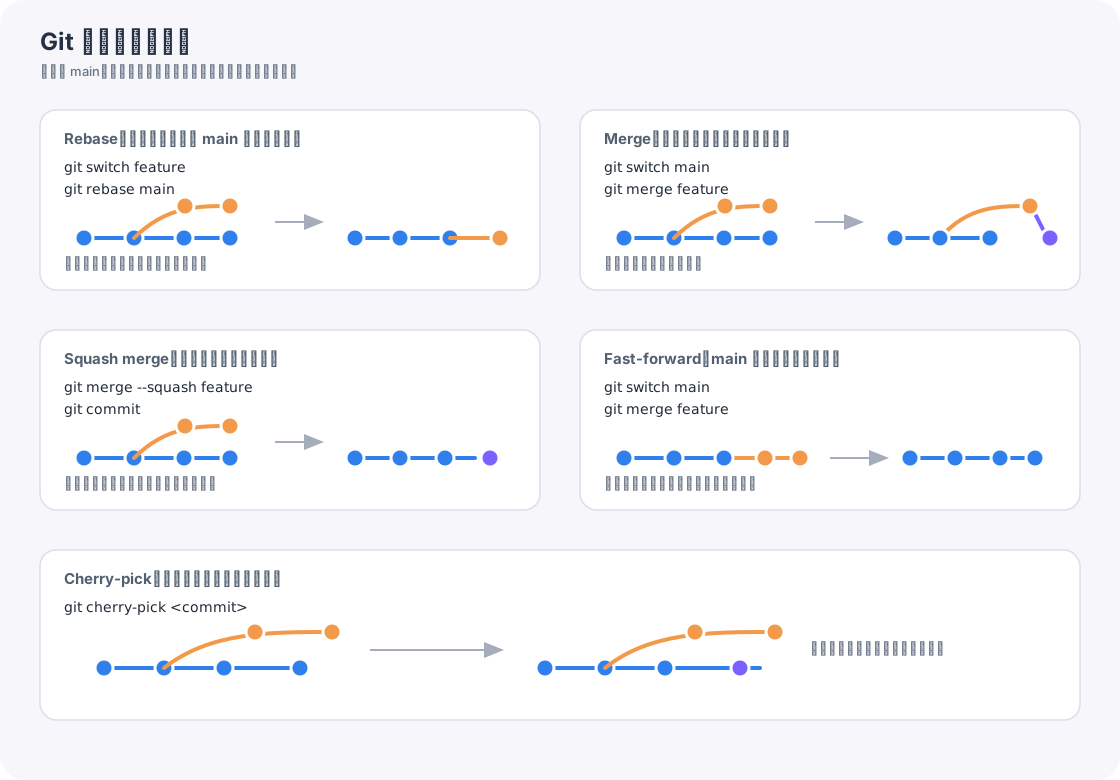
这是一份适合日常开发快速查命令的 Git 速查表,按高频开发场景重新整理。
如果希望按仓库初始化、分支协作和推送流程逐步操作,可以阅读:Git 常见操作。

开始使用
1
2
| git init
git clone git@github.com:owner/repo.git
|
暂存区
常见组合:
1
2
3
4
| git status
git add .
git reset README.md
git rm --cached .env
|
提交
1
2
| git add .
git commit -m "feat: add git cheat sheet"
|
git commit -am 不会自动添加新文件,只适合已经被 Git 跟踪过的文件。
分支切换
1
2
3
| git switch -c feature/login
git branch
git branch -d feature/login
|
查看差异
1
2
3
4
| git diff
git diff --staged
git show HEAD
git diff HEAD~3 HEAD --stat
|
提交引用写法
很多命令里的 <commit> 可以替换成不同形式。
撤销改动
1
2
3
4
| git restore README.md
git restore --staged --worktree README.md
git stash
git stash pop
|
注意
git reset --hard 和 git clean 都可能删除本地改动。执行前先确认没有重要文件。
修改历史
1
2
3
| git rebase -i HEAD~6
git reflog main
git reset --hard 3e887ab
|
交互式 rebase 中可以把需要合并到上一条提交的 pick 改成 fixup。
查历史
1
2
3
| git log --oneline --graph --decorate --all
git log --follow src/app.js
git blame src/app.js
|
合并分叉分支
Rebase
1
2
| git switch feature
git rebase main
|
适合让功能分支历史变直。注意它会改写功能分支提交,已经推给别人协作的分支要谨慎。
Merge
1
2
| git switch main
git merge feature
|
适合保留真实分叉和合并历史。
Squash merge
1
2
3
| git switch main
git merge --squash feature
git commit
|
适合把功能分支的一堆临时提交压成一个业务提交。
Fast-forward
1
2
| git switch main
git merge feature
|
如果 main 没有新提交,Git 可以直接把 main 指针移动到 feature 顶端,不生成新的合并提交。
Cherry-pick
1
| git cherry-pick <commit>
|
适合只把某一个提交复制到当前分支。
恢复旧文件
1
| git restore package.json --source HEAD~3
|
远程仓库
1
2
| git remote add origin git@github.com:owner/repo.git
git remote -v
|
推送
1
2
| git push -u origin feature/login
git push --force-with-lease
|
--force-with-lease 会比 --force 更安全,能减少覆盖别人提交的风险。
拉取
1
2
3
| git fetch origin main
git pull --rebase
git pull
|
暂存临时改动
当前工作没有完成,但需要临时切换分支时,可以使用 stash:
1
2
3
| git stash push -m "work in progress"
git stash list
git stash pop
|
应用指定记录但暂不删除:
1
| git stash apply stash@{0}
|
标签
标签通常用于标记正式发布版本,创建前应确认目标提交正确。
配置
常用配置:
1
2
3
4
| git config --global user.name "Your Name"
git config --global user.email "you@example.com"
git config --global alias.st status
git config --global --list
|
重要文件